<?xml version="1.0" encoding="utf-8"?>
<feed xmlns="http://www.w3.org/2005/Atom">
  <title>Opt-In Software Blog</title>
  <icon>https://optinsoft.net/blog/icon.png</icon>
  
  <link href="https://optinsoft.net/blog/atom.xml" rel="self"/>
  
  <link href="https://optinsoft.net/blog/"/>
  <updated>2026-03-27T05:16:37.378Z</updated>
  <id>https://optinsoft.net/blog/</id>
  
  <author>
    <name>Opt-In Software</name>
    
  </author>
  
  <generator uri="https://hexo.io/">Hexo</generator>
  
  <entry>
    <title>Using ProxyMapService to Fix pip Behind SOCKS5 Proxy</title>
    <link href="https://optinsoft.net/blog/2026/03/27/Using-a-Port-Mapper-to-Fix-pip-Behind-SOCKS5-Proxy/"/>
    <id>https://optinsoft.net/blog/2026/03/27/Using-a-Port-Mapper-to-Fix-pip-Behind-SOCKS5-Proxy/</id>
    <published>2026-03-27T04:46:41.000Z</published>
    <updated>2026-03-27T05:16:37.378Z</updated>
    
    <content type="html"><![CDATA[<p>I ran into an issue where <code>pip</code> wasn’t working due to network restrictions. At the same time, I had access to a SOCKS5 proxy at:</p><pre><code class="hljs plaintext">192.168.1.100:1080</code></pre><p>The problem was that <code>pip</code> doesn’t support SOCKS proxies out of the box. Normally, you’d install <code>PySocks</code> to enable that — but since <code>pip</code> itself wasn’t working, that wasn’t an option.</p><p>I used the <a href="https://github.com/optinsoft/ProxyMapService">ProxyMapService</a> to expose the SOCKS5 proxy as a local HTTP proxy. Here’s the rule I configured:</p><pre><code class="hljs json"><span class="hljs-punctuation">&#123;</span>  <span class="hljs-attr">&quot;Listen&quot;</span><span class="hljs-punctuation">:</span> <span class="hljs-punctuation">&#123;</span>    <span class="hljs-attr">&quot;Port&quot;</span><span class="hljs-punctuation">:</span> <span class="hljs-number">10000</span><span class="hljs-punctuation">,</span>    <span class="hljs-attr">&quot;RejectHttpProxy&quot;</span><span class="hljs-punctuation">:</span> <span class="hljs-literal"><span class="hljs-keyword">false</span></span>  <span class="hljs-punctuation">&#125;</span><span class="hljs-punctuation">,</span>  <span class="hljs-attr">&quot;Authentication&quot;</span><span class="hljs-punctuation">:</span> <span class="hljs-punctuation">&#123;</span>    <span class="hljs-attr">&quot;Required&quot;</span><span class="hljs-punctuation">:</span> <span class="hljs-literal"><span class="hljs-keyword">false</span></span><span class="hljs-punctuation">,</span>    <span class="hljs-attr">&quot;Verify&quot;</span><span class="hljs-punctuation">:</span> <span class="hljs-literal"><span class="hljs-keyword">false</span></span><span class="hljs-punctuation">,</span>    <span class="hljs-attr">&quot;SetAuthentication&quot;</span><span class="hljs-punctuation">:</span> <span class="hljs-literal"><span class="hljs-keyword">false</span></span>  <span class="hljs-punctuation">&#125;</span><span class="hljs-punctuation">,</span>  <span class="hljs-attr">&quot;ProxyServers&quot;</span><span class="hljs-punctuation">:</span> <span class="hljs-punctuation">&#123;</span>    <span class="hljs-attr">&quot;Items&quot;</span><span class="hljs-punctuation">:</span> <span class="hljs-punctuation">[</span>      <span class="hljs-punctuation">&#123;</span>        <span class="hljs-attr">&quot;Host&quot;</span><span class="hljs-punctuation">:</span> <span class="hljs-string">&quot;192.168.1.100&quot;</span><span class="hljs-punctuation">,</span>        <span class="hljs-attr">&quot;Port&quot;</span><span class="hljs-punctuation">:</span> <span class="hljs-number">1080</span><span class="hljs-punctuation">,</span>        <span class="hljs-attr">&quot;ProxyType&quot;</span><span class="hljs-punctuation">:</span> <span class="hljs-string">&quot;Socks5&quot;</span>      <span class="hljs-punctuation">&#125;</span>    <span class="hljs-punctuation">]</span>  <span class="hljs-punctuation">&#125;</span><span class="hljs-punctuation">&#125;</span></code></pre><p>After that, <code>pip</code> started working by pointing it to the local HTTP proxy:</p><pre><code class="hljs plaintext">pip install cython --proxy http://127.0.0.1:10000Collecting cython  Using cached cython-3.2.4-cp311-cp311-win_amd64.whl.metadata (7.7 kB)Using cached cython-3.2.4-cp311-cp311-win_amd64.whl (2.8 MB)Installing collected packages: cythonSuccessfully installed cython-3.2.4</code></pre><p>🎉</p>]]></content>


    <summary type="html">&lt;p&gt;I ran into an issue where &lt;code&gt;pip&lt;/code&gt; wasn’t working due to network restrictions. At the same time, I had access to a SOCKS5 proxy</summary>


    <category term="ProxyMapService" scheme="https://optinsoft.net/blog/categories/ProxyMapService/"/>
    
    
    <category term="socks5" scheme="https://optinsoft.net/blog/tags/socks5/"/>
    
    <category term="proxy" scheme="https://optinsoft.net/blog/tags/proxy/"/>
    
    <category term="pip" scheme="https://optinsoft.net/blog/tags/pip/"/>
    
  </entry>
  
  <entry>
    <title>Making Any Scraper Work with Sticky Proxies</title>
    <link href="https://optinsoft.net/blog/2026/01/16/Making-Any-Scraper-Work-with-Sticky-Proxies/"/>
    <id>https://optinsoft.net/blog/2026/01/16/Making-Any-Scraper-Work-with-Sticky-Proxies/</id>
    <published>2026-01-16T06:45:20.000Z</published>
    <updated>2026-01-16T07:37:49.843Z</updated>
    
    <content type="html"><![CDATA[<h1 id="How-to-Use-Sticky-Proxies-in-Applications-That-Don’t-Support-Them"><a href="#How-to-Use-Sticky-Proxies-in-Applications-That-Don’t-Support-Them" class="headerlink" title="How to Use Sticky Proxies in Applications That Don’t Support Them"></a>How to Use Sticky Proxies in Applications That Don’t Support Them</h1><p>Many modern proxy providers sell so-called <strong>sticky proxies</strong> (also known as session-based proxies). This is a very popular solution for scraping, automation, data collection, and working around anti-bot protections.</p><h2 id="What-is-a-sticky-proxy"><a href="#What-is-a-sticky-proxy" class="headerlink" title="What is a sticky proxy?"></a>What is a sticky proxy?</h2><p>A <strong>sticky proxy</strong> is a proxy server that “locks” one IP address to you for a certain amount of time (for example, 5 or 10 minutes) using a session. Usually, the session is defined via the username, for example:</p><pre><code class="hljs plaintext">user-session-ABC123-sessTime-10:password@proxy_host:proxy_port</code></pre><p>While the session is active, you will access the internet from the same IP address. When the time expires or you change the session ID, you get a new IP.</p><p>Today, <strong>most large proxy providers</strong> (residential, mobile, ISP) work exactly this way: you connect to a single host and port, and IP rotation is controlled via parameters in the username.</p><h2 id="The-problem-not-all-software-supports-sticky-proxies"><a href="#The-problem-not-all-software-supports-sticky-proxies" class="headerlink" title="The problem: not all software supports sticky proxies"></a>The problem: not all software supports sticky proxies</h2><p>Many applications (scraping software, old parsers, bots, automation tools):</p><ul><li>❌ cannot work with proxies that require authentication  </li><li>❌ cannot manage sessions  </li><li>❌ expect <strong>just a list of IP:PORT</strong>, without username and password</li></ul><p>Because of this, they cannot be directly connected to modern sticky proxy providers.</p><h2 id="The-solution-map-local-TCP-ports-through-sticky-proxies"><a href="#The-solution-map-local-TCP-ports-through-sticky-proxies" class="headerlink" title="The solution: map local TCP ports through sticky proxies"></a>The solution: map local TCP ports through sticky proxies</h2><p>The idea is very simple:</p><ul><li>We run a local service</li><li>It opens a <strong>range of local ports</strong></li><li>Each local port:<ul><li>automatically connects to the sticky proxy</li><li>uses <strong>its own separate session</strong></li></ul></li><li>As a result:<ul><li><code>127.0.0.1:5001</code> → sticky proxy session AAA1  </li><li><code>127.0.0.1:5002</code> → sticky proxy session AAA2  </li><li><code>127.0.0.1:5003</code> → sticky proxy session AAA3  </li><li>and so on</li></ul></li></ul><p>And your software just works with regular proxies without authentication:</p><pre><code class="hljs plaintext">127.0.0.1:5001127.0.0.1:5002127.0.0.1:5003</code></pre><h2 id="Ready-made-solution-ProxyMapService"><a href="#Ready-made-solution-ProxyMapService" class="headerlink" title="Ready-made solution: ProxyMapService"></a>Ready-made solution: ProxyMapService</h2><p>For this purpose, the following open-source project works perfectly:</p><p>👉 <strong>ProxyMapService</strong><br><a href="https://github.com/optinsoft/ProxyMapService">https://github.com/optinsoft/ProxyMapService</a></p><p>It can:</p><ul><li>map port ranges</li><li>automatically manage sticky sessions</li><li>work with HTTP &#x2F; SOCKS proxies</li><li>modify &#x2F; generate username parameters</li></ul><h2 id="Configuration-example"><a href="#Configuration-example" class="headerlink" title="Configuration example"></a>Configuration example</h2><p>Here is an example config:</p><pre><code class="hljs json"><span class="hljs-attr">&quot;ProxyMappings&quot;</span><span class="hljs-punctuation">:</span> <span class="hljs-punctuation">[</span>  <span class="hljs-punctuation">&#123;</span>    <span class="hljs-attr">&quot;Listen&quot;</span><span class="hljs-punctuation">:</span> <span class="hljs-punctuation">&#123;</span>      <span class="hljs-attr">&quot;PortRange&quot;</span><span class="hljs-punctuation">:</span> <span class="hljs-punctuation">&#123;</span>        <span class="hljs-attr">&quot;Start&quot;</span><span class="hljs-punctuation">:</span> <span class="hljs-number">10001</span><span class="hljs-punctuation">,</span>        <span class="hljs-attr">&quot;End&quot;</span><span class="hljs-punctuation">:</span> <span class="hljs-number">10100</span>      <span class="hljs-punctuation">&#125;</span><span class="hljs-punctuation">,</span>      <span class="hljs-attr">&quot;RejectHttpProxy&quot;</span><span class="hljs-punctuation">:</span> <span class="hljs-literal"><span class="hljs-keyword">false</span></span><span class="hljs-punctuation">,</span>      <span class="hljs-attr">&quot;StickyProxyLifetime&quot;</span><span class="hljs-punctuation">:</span> <span class="hljs-number">10</span>    <span class="hljs-punctuation">&#125;</span><span class="hljs-punctuation">,</span>    <span class="hljs-attr">&quot;Authentication&quot;</span><span class="hljs-punctuation">:</span> <span class="hljs-punctuation">&#123;</span>      <span class="hljs-attr">&quot;Required&quot;</span><span class="hljs-punctuation">:</span> <span class="hljs-literal"><span class="hljs-keyword">false</span></span><span class="hljs-punctuation">,</span>      <span class="hljs-attr">&quot;Verify&quot;</span><span class="hljs-punctuation">:</span> <span class="hljs-literal"><span class="hljs-keyword">false</span></span><span class="hljs-punctuation">,</span>      <span class="hljs-attr">&quot;SetAuthentication&quot;</span><span class="hljs-punctuation">:</span> <span class="hljs-literal"><span class="hljs-keyword">false</span></span><span class="hljs-punctuation">,</span>      <span class="hljs-attr">&quot;RemoveAuthentication&quot;</span><span class="hljs-punctuation">:</span> <span class="hljs-literal"><span class="hljs-keyword">false</span></span>    <span class="hljs-punctuation">&#125;</span><span class="hljs-punctuation">,</span>    <span class="hljs-attr">&quot;ProxyServers&quot;</span><span class="hljs-punctuation">:</span> <span class="hljs-punctuation">&#123;</span>      <span class="hljs-attr">&quot;Items&quot;</span><span class="hljs-punctuation">:</span> <span class="hljs-punctuation">[</span>        <span class="hljs-punctuation">&#123;</span>          <span class="hljs-attr">&quot;Host&quot;</span><span class="hljs-punctuation">:</span> <span class="hljs-string">&quot;PROXY_IP&quot;</span><span class="hljs-punctuation">,</span>          <span class="hljs-attr">&quot;Port&quot;</span><span class="hljs-punctuation">:</span> PROXY_PORT<span class="hljs-punctuation">,</span>          <span class="hljs-attr">&quot;ProxyType&quot;</span><span class="hljs-punctuation">:</span> <span class="hljs-string">&quot;Http&quot;</span><span class="hljs-punctuation">,</span>          <span class="hljs-attr">&quot;Username&quot;</span><span class="hljs-punctuation">:</span> <span class="hljs-string">&quot;USERNAME&quot;</span><span class="hljs-punctuation">,</span>          <span class="hljs-attr">&quot;Password&quot;</span><span class="hljs-punctuation">:</span> <span class="hljs-string">&quot;PASSWORD&quot;</span><span class="hljs-punctuation">,</span>          <span class="hljs-attr">&quot;UsernameParameters&quot;</span><span class="hljs-punctuation">:</span> <span class="hljs-punctuation">[</span>            <span class="hljs-punctuation">&#123;</span>              <span class="hljs-attr">&quot;Name&quot;</span><span class="hljs-punctuation">:</span> <span class="hljs-string">&quot;zone&quot;</span><span class="hljs-punctuation">,</span>              <span class="hljs-attr">&quot;Value&quot;</span><span class="hljs-punctuation">:</span> <span class="hljs-string">&quot;custom&quot;</span>            <span class="hljs-punctuation">&#125;</span><span class="hljs-punctuation">,</span>            <span class="hljs-punctuation">&#123;</span>              <span class="hljs-attr">&quot;Name&quot;</span><span class="hljs-punctuation">:</span> <span class="hljs-string">&quot;region&quot;</span><span class="hljs-punctuation">,</span>              <span class="hljs-attr">&quot;Value&quot;</span><span class="hljs-punctuation">:</span> <span class="hljs-string">&quot;US&quot;</span>            <span class="hljs-punctuation">&#125;</span><span class="hljs-punctuation">,</span>            <span class="hljs-punctuation">&#123;</span>              <span class="hljs-attr">&quot;Name&quot;</span><span class="hljs-punctuation">:</span> <span class="hljs-string">&quot;session&quot;</span><span class="hljs-punctuation">,</span>              <span class="hljs-attr">&quot;Value&quot;</span><span class="hljs-punctuation">:</span> <span class="hljs-string">&quot;^[A-Za-z]&#123;8&#125;&quot;</span><span class="hljs-punctuation">,</span>              <span class="hljs-attr">&quot;SessionId&quot;</span><span class="hljs-punctuation">:</span> <span class="hljs-literal"><span class="hljs-keyword">true</span></span>            <span class="hljs-punctuation">&#125;</span><span class="hljs-punctuation">,</span>            <span class="hljs-punctuation">&#123;</span>              <span class="hljs-attr">&quot;Name&quot;</span><span class="hljs-punctuation">:</span> <span class="hljs-string">&quot;sessTime&quot;</span><span class="hljs-punctuation">,</span>              <span class="hljs-attr">&quot;Value&quot;</span><span class="hljs-punctuation">:</span> <span class="hljs-string">&quot;$sessTime&quot;</span><span class="hljs-punctuation">,</span>              <span class="hljs-attr">&quot;Default&quot;</span><span class="hljs-punctuation">:</span> <span class="hljs-string">&quot;10&quot;</span><span class="hljs-punctuation">,</span>              <span class="hljs-attr">&quot;SessionTime&quot;</span><span class="hljs-punctuation">:</span> <span class="hljs-literal"><span class="hljs-keyword">true</span></span>            <span class="hljs-punctuation">&#125;</span>          <span class="hljs-punctuation">]</span>        <span class="hljs-punctuation">&#125;</span>      <span class="hljs-punctuation">]</span>    <span class="hljs-punctuation">&#125;</span>  <span class="hljs-punctuation">&#125;</span><span class="hljs-punctuation">]</span></code></pre><p>⚠️ In this example you need to replace:</p><ul><li><code>PROXY_IP</code></li><li><code>PROXY_PORT</code></li><li><code>USERNAME</code></li><li><code>PASSWORD</code></li></ul><p>with the values provided by your proxy provider.</p><h2 id="How-does-it-work-in-practice"><a href="#How-does-it-work-in-practice" class="headerlink" title="How does it work in practice?"></a>How does it work in practice?</h2><ul><li><p>ProxyMapService opens local ports <code>10001–10100</code></p></li><li><p>Each port:</p><ul><li>automatically generates a new sticky session</li><li>keeps it for <code>StickyProxyLifetime = 10</code> minutes</li></ul></li><li><p>You just set in your software:</p></li></ul><pre><code class="hljs plaintext">127.0.0.1:10001127.0.0.1:10002127.0.0.1:10003...</code></pre><h2 id="Conclusion"><a href="#Conclusion" class="headerlink" title="Conclusion"></a>Conclusion</h2><p>If your software:</p><ul><li>doesn’t support proxy authentication</li><li>doesn’t support sessions</li><li>only works with <code>IP:PORT</code> lists</li></ul><p>➡️ <strong>ProxyMapService solves this problem completely</strong>, allowing you to use modern sticky proxies without modifying your software.</p><p>Useful for:</p><ul><li>scraping software</li><li>bots</li><li>automation tools</li><li>legacy tools</li><li>and basically any software with poor proxy support</li></ul>]]></content>


    <summary type="html">&lt;h1 id=&quot;How-to-Use-Sticky-Proxies-in-Applications-That-Don’t-Support-Them&quot;&gt;&lt;a</summary>


    <category term="ProxyMapService" scheme="https://optinsoft.net/blog/categories/ProxyMapService/"/>
    
    
    <category term="sticky-proxy" scheme="https://optinsoft.net/blog/tags/sticky-proxy/"/>
    
    <category term="proxy-server" scheme="https://optinsoft.net/blog/tags/proxy-server/"/>
    
    <category term="rotating-proxy" scheme="https://optinsoft.net/blog/tags/rotating-proxy/"/>
    
    <category term="scraping" scheme="https://optinsoft.net/blog/tags/scraping/"/>
    
    <category term="proxy-rotation" scheme="https://optinsoft.net/blog/tags/proxy-rotation/"/>
    
    <category term="session-based-proxy" scheme="https://optinsoft.net/blog/tags/session-based-proxy/"/>
    
  </entry>
  
  <entry>
    <title>ProxyMapService: ParseUsernameParameters</title>
    <link href="https://optinsoft.net/blog/2025/12/19/ProxyMapService-ParseUsernameParameters/"/>
    <id>https://optinsoft.net/blog/2025/12/19/ProxyMapService-ParseUsernameParameters/</id>
    <published>2025-12-19T10:33:06.000Z</published>
    <updated>2026-01-16T06:55:33.414Z</updated>
    
    <content type="html"><![CDATA[<p>We’re excited to announce a new, optional feature in the <strong><a href="https://github.com/optinsoft/ProxyMapService">ProxyMapService</a></strong> application. This feature enhances the flexibility of the authentication process by allowing you to simplify username validation.</p><h2 id="The-Challenge-Managing-Complex-Usernames"><a href="#The-Challenge-Managing-Complex-Usernames" class="headerlink" title="The Challenge: Managing Complex Usernames"></a>The Challenge: Managing Complex Usernames</h2><p>Sometimes, proxy usernames need to encode more information than just the account identifier. </p><p>For example, a proxy might look like this:</p><p><a href="http://user-zone-custom-region-US-session-1234567-sessionTime-5:1111@127.0.0.1:8888/">http://user-zone-custom-region-US-session-1234567-sessionTime-5:1111@127.0.0.1:8888</a></p><p>Username part of the proxy is <code>user-zone-custom-region-US-session-1234567-sessionTime-5</code>.</p><p>While this format might be necessary for other parts of the system or for identification, it complicates the standard authentication process by requiring the system to ignore the extra parts (<code>zone</code>, <code>region</code>, <code>session</code>, etc.) and focus solely on the actual username.</p><h2 id="The-Solution-Introducing-ParseUsernameParameters"><a href="#The-Solution-Introducing-ParseUsernameParameters" class="headerlink" title="The Solution: Introducing ParseUsernameParameters"></a>The Solution: Introducing <code>ParseUsernameParameters</code></h2><p>To address this need for cleaner authentication, we’ve introduced a new configuration parameter called <strong><code>ParseUsernameParameters</code></strong>. This boolean parameter resides within the <code>Authentication</code> section of the <code>appsettings.json</code> file.</p><ul><li><strong>Parameter Name:</strong> <code>ParseUsernameParameters</code></li><li><strong>Allowed Values:</strong> <code>true</code> or <code>false</code> (default is <code>false</code>)</li></ul><h3 id="What-Does-This-Parameter-Do"><a href="#What-Does-This-Parameter-Do" class="headerlink" title="What Does This Parameter Do?"></a>What Does This Parameter Do?</h3><p>When set to <code>true</code>, the <code>ProxyMapService</code> will parse the username string during authentication. It splits the username using the hyphen (<code>-</code>) delimiter. <strong>Crucially, only the first segment (the part <em>before</em> the first hyphen) is used for the authentication check.</strong> The remaining segments are ignored.</p><h3 id="How-It-Works-Example"><a href="#How-It-Works-Example" class="headerlink" title="How It Works (Example)"></a>How It Works (Example)</h3><p>Let’s take a look at the authentication logic with <code>ParseUsernameParameters=true</code>:</p><ol><li><p><strong>Input Username (part of the proxy):</strong></p><pre><code class="hljs plaintext">&quot;user-zone-custom-region-US-session-1234567-sessionTime-5&quot;</code></pre></li><li><p><strong>Authentication Logic (with <code>ParseUsernameParameters=true</code>):</strong></p><ul><li>The username string <code>user-zone-custom-region-US-session-1234567-sessionTime-5</code> is split using the <code>-</code> character.</li><li>The resulting parts are: <code>[&quot;user&quot;, &quot;zone&quot;, &quot;custom&quot;, &quot;region&quot;, &quot;US&quot;, &quot;session&quot;, &quot;1234567&quot;, &quot;sessionTime&quot;, &quot;5&quot;]</code></li><li><strong>Authentication Check:</strong> The system compares the <em>first part</em>, <code>user</code>, to the configured <code>Username</code> value (e.g., <code>&quot;user&quot;</code> from the example config). The rest of the parts are completely ignored for authentication.</li></ul></li></ol><h3 id="Configuration-Example-appsettings-json"><a href="#Configuration-Example-appsettings-json" class="headerlink" title="Configuration Example (appsettings.json)"></a>Configuration Example (<code>appsettings.json</code>)</h3><p>Here’s how you would enable this feature in your <code>appsettings.json</code>:</p><pre><code class="language-json">&#123;  &quot;Authentication&quot;: &#123;    // ... other authentication settings ...    &quot;Required&quot;: true,    &quot;Verify&quot;: true,    &quot;ParseUsernameParameters&quot;: true,    &quot;Username&quot;: &quot;user&quot;,  // This is the base username to compare against    &quot;Password&quot;: &quot;1111&quot;    // Password  &#125;&#125;</code></pre>]]></content>


    <summary type="html">&lt;p&gt;We’re excited to announce a new, optional feature in the &lt;strong&gt;&lt;a</summary>


    <category term="ProxyMapService" scheme="https://optinsoft.net/blog/categories/ProxyMapService/"/>
    
    
    <category term="Authentication" scheme="https://optinsoft.net/blog/tags/Authentication/"/>
    
    <category term="ParseUsernameParameters" scheme="https://optinsoft.net/blog/tags/ParseUsernameParameters/"/>
    
  </entry>
  
  <entry>
    <title>Web Proxy Checker v2.111 Released</title>
    <link href="https://optinsoft.net/blog/2025/12/11/Web-Proxy-Checker-v2-111-Released/"/>
    <id>https://optinsoft.net/blog/2025/12/11/Web-Proxy-Checker-v2-111-Released/</id>
    <published>2025-12-11T09:21:38.000Z</published>
    <updated>2025-12-11T09:41:19.703Z</updated>
    
    <content type="html"><![CDATA[<h1 id="Enhanced-Authentication-for-Problematic-Proxies"><a href="#Enhanced-Authentication-for-Problematic-Proxies" class="headerlink" title="Enhanced Authentication for Problematic Proxies"></a>Enhanced Authentication for Problematic Proxies</h1><p>We’re pleased to announce the release of <strong><a href="/wpc/">Web Proxy Checker version 2.111</a></strong> – our reliable tool for testing proxy server functionality now includes improved handling for CONNECT (HTTPS) proxies with non-standard authentication behavior.</p><h2 id="Standard-Proxy-Authentication-Flow"><a href="#Standard-Proxy-Authentication-Flow" class="headerlink" title="Standard Proxy Authentication Flow"></a>Standard Proxy Authentication Flow</h2><p>When connecting to a proxy requiring Basic Authentication, the expected protocol is:</p><ol><li>Client (browser or our tool) connects without credentials</li><li>Proxy responds with “407 Proxy Authentication Required”</li><li>Client reconnects with the Proxy-Authorization HTTP header</li><li>Connection proceeds if credentials are valid</li></ol><p>This standard flow is used by all major browsers (Chrome, Firefox, Edge) and has been Web Proxy Checker’s default behavior.</p><h2 id="The-Challenge-Non-Compliant-Proxies"><a href="#The-Challenge-Non-Compliant-Proxies" class="headerlink" title="The Challenge: Non-Compliant Proxies"></a>The Challenge: Non-Compliant Proxies</h2><p>During testing, we identified proxies that don’t follow authentication standards. Instead of returning the proper 407 error, they immediately close connections when credentials are missing. This creates a compatibility issue where legitimate authentication attempts fail.</p><h2 id="New-Feature-“Connect-Basic-Authentication”-Setting"><a href="#New-Feature-“Connect-Basic-Authentication”-Setting" class="headerlink" title="New Feature: “Connect Basic Authentication” Setting"></a>New Feature: “Connect Basic Authentication” Setting</h2><p>Version 2.111 introduces a solution on the <strong>HTTP</strong> tab: the new <strong>“Connect Basic Authentication”</strong> option.</p><h3 id="How-it-works"><a href="#How-it-works" class="headerlink" title="How it works:"></a>How it works:</h3><ul><li><strong>Disabled (Default)</strong>: Standard behavior – waits for 407 response before sending credentials</li><li><strong>Enabled</strong>: Immediately includes Proxy-Authorization header in the first connection attempt</li><li><strong>Result</strong>: Compatibility with proxies that require immediate authentication</li></ul><h2 id="Usage-Recommendations"><a href="#Usage-Recommendations" class="headerlink" title="Usage Recommendations:"></a>Usage Recommendations:</h2><ul><li>Most users should keep this setting disabled (works with standard proxies)</li><li>Enable only when encountering proxies that close connections without 407 responses</li><li>Particularly useful for certain corporate or custom proxy setups</li></ul><h2 id="Quick-Setup"><a href="#Quick-Setup" class="headerlink" title="Quick Setup:"></a>Quick Setup:</h2><ol><li>Launch Web Proxy Checker v2.111</li><li>Go to the <strong>HTTP</strong> tab</li><li>Find <strong>“Connect Basic Authentication”</strong> checkbox</li><li>Enable for problematic proxies, disable for standard ones</li></ol><h2 id="What-This-Means-for-You"><a href="#What-This-Means-for-You" class="headerlink" title="What This Means for You:"></a>What This Means for You:</h2><ul><li>✓ Wider proxy compatibility</li><li>✓ No more failed connections with non-standard proxies</li><li>✓ Backward compatibility maintained</li><li>✓ Easy toggle between authentication modes</li></ul><h2 id="Upgrade-Today"><a href="#Upgrade-Today" class="headerlink" title="Upgrade Today"></a>Upgrade Today</h2><p><strong><a href="/wpc/">Download Web Proxy Checker v2.111</a></strong> and experience improved compatibility with all your proxy servers!</p>]]></content>


    <summary type="html">&lt;h1 id=&quot;Enhanced-Authentication-for-Problematic-Proxies&quot;&gt;&lt;a href=&quot;#Enhanced-Authentication-for-Problematic-Proxies&quot; class=&quot;headerlink&quot;</summary>


    <category term="Web Proxy Checker" scheme="https://optinsoft.net/blog/categories/Web-Proxy-Checker/"/>
    
    
    <category term="WebProxyChecker" scheme="https://optinsoft.net/blog/tags/WebProxyChecker/"/>
    
    <category term="v2111" scheme="https://optinsoft.net/blog/tags/v2111/"/>
    
    <category term="Update" scheme="https://optinsoft.net/blog/tags/Update/"/>
    
    <category term="ProxyAuthorization" scheme="https://optinsoft.net/blog/tags/ProxyAuthorization/"/>
    
  </entry>
  
  <entry>
    <title>ProxyMapService Diagnostics in Windows Event Log</title>
    <link href="https://optinsoft.net/blog/2025/10/28/ProxyMapService-Diagnostics-in-Windows-Event-Log/"/>
    <id>https://optinsoft.net/blog/2025/10/28/ProxyMapService-Diagnostics-in-Windows-Event-Log/</id>
    <published>2025-10-28T15:52:38.000Z</published>
    <updated>2026-01-16T06:51:07.293Z</updated>
    
    <content type="html"><![CDATA[<p><strong><a href="https://github.com/optinsoft/ProxyMapService">ProxyMapService</a></strong> now supports outputting diagnostic messages directly to the <strong>Windows Event Log</strong>.</p><hr><h3 id="1-Enabling-Event-Log-Logging"><a href="#1-Enabling-Event-Log-Logging" class="headerlink" title="1. Enabling Event Log Logging"></a>1. Enabling Event Log Logging</h3><p>To enable writing events to the Windows Event Log, you need to make a small change in your project’s configuration file — <code>appsettings.json</code>.</p><p>Add the <code>EventLog</code> section within the <code>Logging</code> block, specifying the desired minimum logging level. The example below sets the level to <strong>“Information”</strong>:</p><pre><code class="hljs json"><span class="hljs-punctuation">&#123;</span>  <span class="hljs-attr">&quot;Logging&quot;</span><span class="hljs-punctuation">:</span> <span class="hljs-punctuation">&#123;</span>    <span class="hljs-attr">&quot;EventLog&quot;</span><span class="hljs-punctuation">:</span> <span class="hljs-punctuation">&#123;</span>      <span class="hljs-attr">&quot;LogLevel&quot;</span><span class="hljs-punctuation">:</span> <span class="hljs-punctuation">&#123;</span>        <span class="hljs-attr">&quot;Default&quot;</span><span class="hljs-punctuation">:</span> <span class="hljs-string">&quot;Information&quot;</span>      <span class="hljs-punctuation">&#125;</span>    <span class="hljs-punctuation">&#125;</span>  <span class="hljs-punctuation">&#125;</span><span class="hljs-punctuation">&#125;</span></code></pre><blockquote><p>💡 <strong>Note:</strong> The <code>Default</code> level within the <code>EventLog</code> section determines the minimum level (Trace, Debug, Information, Warning, Error, Critical) at which messages will be written to the log.</p></blockquote><hr><h3 id="2-Mandatory-Step-Registering-the-Event-Source-PowerShell"><a href="#2-Mandatory-Step-Registering-the-Event-Source-PowerShell" class="headerlink" title="2. Mandatory Step: Registering the Event Source (PowerShell)"></a>2. Mandatory Step: Registering the Event Source (PowerShell)</h3><p><strong>Attention!</strong> For messages to be successfully displayed in the Event Log and for the system to correctly identify their source and formatting, it is <strong>necessary to register the event source</strong> with the name <code>ProxyMapService</code> beforehand.</p><p>Event source registration is <strong>only required once</strong> upon installation or update of the service.</p><p>Use <strong>PowerShell run as administrator</strong> and execute the following command. This command creates the necessary registry key:</p><pre><code class="hljs powershell"><span class="hljs-built_in">New-EventLog</span> <span class="hljs-literal">-LogName</span> Application <span class="hljs-literal">-Source</span> ProxyMapService</code></pre><ul><li><code>New-EventLog</code>: The cmdlet used to create a new event source.</li><li><code>-LogName Application</code>: Specifies that the source will write to the standard “Application” log.</li><li><code>-Source ProxyMapService</code>: Sets the source name, which must match the name used within the service code.</li></ul><hr><h3 id="3-Viewing-the-Events"><a href="#3-Viewing-the-Events" class="headerlink" title="3. Viewing the Events"></a>3. Viewing the Events</h3><p>After configuring <code>appsettings.json</code> and registering the source, restart the <strong>ProxyMapService</strong>. All events at the <code>Information</code> level and above will now be available for viewing in the <strong>Windows Event Viewer</strong> under <strong>Windows Logs</strong> $\rightarrow$ <strong>Application</strong>.</p><p>Look for messages with the <strong>Source</strong>: <code>ProxyMapService</code>.</p><p><strong>🔗 Source Code and Discussion:</strong> As always, you can find the latest version of the project on GitHub: <a href="https://github.com/optinsoft/ProxyMapService">https://github.com/optinsoft/ProxyMapService</a></p>]]></content>


    <summary type="html">&lt;p&gt;&lt;strong&gt;&lt;a href=&quot;https://github.com/optinsoft/ProxyMapService&quot;&gt;ProxyMapService&lt;/a&gt;&lt;/strong&gt; now supports outputting diagnostic messages</summary>


    <category term="ProxyMapService" scheme="https://optinsoft.net/blog/categories/ProxyMapService/"/>
    
    
    <category term="EventLog" scheme="https://optinsoft.net/blog/tags/EventLog/"/>
    
    <category term="Windows" scheme="https://optinsoft.net/blog/tags/Windows/"/>
    
  </entry>
  
  <entry>
    <title>CountryTimezone</title>
    <link href="https://optinsoft.net/blog/2025/10/14/CountryTimezone/"/>
    <id>https://optinsoft.net/blog/2025/10/14/CountryTimezone/</id>
    <published>2025-10-14T09:54:51.000Z</published>
    <updated>2025-10-14T10:23:15.325Z</updated>
    
    <content type="html"><![CDATA[<p>If you’ve worked with timezones in Python, you’ve probably used pytz to get IANA timezone names for specific countries:</p><pre><code class="hljs python">tz_names = pytz.country_timezones.get(country.upper(), [])</code></pre><p>When I needed similar functionality in Delphi, I was surprised to find that there wasn’t a readily available library to get IANA timezone names for countries.</p><p>After searching without success, I decided to create my own solution:</p><p><a href="https://github.com/optinsoft/CountryTimezone"><strong>https://github.com/optinsoft/CountryTimezone</strong></a></p><p>Here’s a practical example that demonstrates how to get a random timezone name and its UTC offset for a given country:</p><pre><code class="hljs pascal"><span class="hljs-keyword">uses</span> CountryTimezone, TZDB;<span class="hljs-keyword">type</span>   TTimezoneAndOffset = <span class="hljs-keyword">record</span>        <span class="hljs-keyword">name</span>: <span class="hljs-keyword">String</span>;        offset: Integer;   <span class="hljs-keyword">end</span>;<span class="hljs-function"><span class="hljs-keyword">function</span> <span class="hljs-title">GetRandomTimezoneAndOffset</span><span class="hljs-params">(country: <span class="hljs-keyword">String</span>)</span>:</span> TTimezoneAndOffset;<span class="hljs-keyword">var</span>  LCTZDict: TCountryTimezoneDictionary;  LCTZList: TStringList;  tz: TBundledTimeZone;<span class="hljs-keyword">begin</span>  LCTZDict := TCountryTimezoneDictionary.Create();  LCTZList := TStringList.Create;  <span class="hljs-keyword">try</span>    LCTZDict.GetCountryTimezones(country, LCTZList);    Result.<span class="hljs-keyword">name</span> := LCTZList[Random(LCTZList.Count)];    tz := TBundledTimeZone.GetTimeZone(Result.<span class="hljs-keyword">name</span>);    Result.offset := Trunc(tz.UtcOffset.TotalMinutes);  <span class="hljs-keyword">finally</span>    LCTZList.Free;    LCTZDict.Free;  <span class="hljs-keyword">end</span>;<span class="hljs-keyword">end</span>;</code></pre><p>This function:</p><ol><li>Creates a country timezone dictionary</li><li>Retrieves all timezone names for the specified country</li><li>Selects a random timezone from the list</li><li>Uses TZDB to get the UTC offset in minutes for that timezone</li></ol>]]></content>


    <summary type="html">&lt;p&gt;If you’ve worked with timezones in Python, you’ve probably used pytz to get IANA timezone names for specific countries:&lt;/p&gt;
&lt;pre&gt;&lt;code</summary>


    <category term="GitHub" scheme="https://optinsoft.net/blog/categories/GitHub/"/>
    
    
    <category term="delphi" scheme="https://optinsoft.net/blog/tags/delphi/"/>
    
    <category term="TZDB" scheme="https://optinsoft.net/blog/tags/TZDB/"/>
    
    <category term="country" scheme="https://optinsoft.net/blog/tags/country/"/>
    
    <category term="timezone" scheme="https://optinsoft.net/blog/tags/timezone/"/>
    
  </entry>
  
  <entry>
    <title>renamedecl</title>
    <link href="https://optinsoft.net/blog/2025/10/10/renamedecl/"/>
    <id>https://optinsoft.net/blog/2025/10/10/renamedecl/</id>
    <published>2025-10-10T14:35:07.000Z</published>
    <updated>2025-10-10T15:24:57.715Z</updated>
    
    <content type="html"><![CDATA[<h1 id="🔄-Renaming-Variables-and-Functions-in-JavaScript-Using-ASTs"><a href="#🔄-Renaming-Variables-and-Functions-in-JavaScript-Using-ASTs" class="headerlink" title="🔄 Renaming Variables and Functions in JavaScript Using ASTs"></a>🔄 Renaming Variables and Functions in JavaScript Using ASTs</h1><p>When working with JavaScript, there are times you might want to automatically rename variables or functions across your code — perhaps for <strong>obfuscation</strong>, <strong>code transformation</strong>, or <strong>refactoring</strong>. Doing this safely, without accidentally breaking your program, requires understanding how your code is structured — and that’s where the <strong>Abstract Syntax Tree (AST)</strong> comes in.</p><p>In this post, we’ll look at how to rename variable and function declarations using ASTs, with a simple utility <a href="https://github.com/optinsoft/renamedecl">renamedecl</a>.</p><hr><h2 id="🌳-What-Is-an-AST"><a href="#🌳-What-Is-an-AST" class="headerlink" title="🌳 What Is an AST?"></a>🌳 What Is an AST?</h2><p>An <strong>Abstract Syntax Tree (AST)</strong> is a structured, tree-like representation of your source code.<br>Instead of dealing with raw text, you work with objects that represent <strong>program constructs</strong> like variables, functions, loops, and expressions.</p><p>For example, the code:</p><pre><code class="hljs js"><span class="hljs-keyword">const</span> x = <span class="hljs-number">5</span>;<span class="hljs-variable language_">console</span>.<span class="hljs-title function_">log</span>(x);</code></pre><p>can be represented (simplified) as:</p><pre><code class="hljs js">&#123;  <span class="hljs-attr">type</span>: <span class="hljs-string">&quot;Program&quot;</span>,  <span class="hljs-attr">body</span>: [    &#123;      <span class="hljs-attr">type</span>: <span class="hljs-string">&quot;VariableDeclaration&quot;</span>,      <span class="hljs-attr">declarations</span>: [        &#123;          <span class="hljs-attr">type</span>: <span class="hljs-string">&quot;VariableDeclarator&quot;</span>,          <span class="hljs-attr">id</span>: &#123; <span class="hljs-attr">type</span>: <span class="hljs-string">&quot;Identifier&quot;</span>, <span class="hljs-attr">name</span>: <span class="hljs-string">&quot;x&quot;</span> &#125;,          <span class="hljs-attr">init</span>: &#123; <span class="hljs-attr">type</span>: <span class="hljs-string">&quot;Literal&quot;</span>, <span class="hljs-attr">value</span>: <span class="hljs-number">5</span> &#125;        &#125;      ]    &#125;,    &#123;      <span class="hljs-attr">type</span>: <span class="hljs-string">&quot;ExpressionStatement&quot;</span>,      <span class="hljs-attr">expression</span>: &#123;        <span class="hljs-attr">type</span>: <span class="hljs-string">&quot;CallExpression&quot;</span>,        <span class="hljs-attr">callee</span>: &#123;          <span class="hljs-attr">object</span>: &#123; <span class="hljs-attr">name</span>: <span class="hljs-string">&quot;console&quot;</span> &#125;,          <span class="hljs-attr">property</span>: &#123; <span class="hljs-attr">name</span>: <span class="hljs-string">&quot;log&quot;</span> &#125;        &#125;,        <span class="hljs-attr">arguments</span>: [&#123; <span class="hljs-attr">type</span>: <span class="hljs-string">&quot;Identifier&quot;</span>, <span class="hljs-attr">name</span>: <span class="hljs-string">&quot;x&quot;</span> &#125;]      &#125;    &#125;  ]&#125;</code></pre><p>By working with this structure, you can programmatically modify parts of your code (e.g. change <code>x</code> to <code>width</code>) and then regenerate valid JavaScript source code.</p><hr><h2 id="🧩-Tools-Acorn-Escodegen"><a href="#🧩-Tools-Acorn-Escodegen" class="headerlink" title="🧩 Tools: Acorn, Escodegen"></a>🧩 Tools: Acorn, Escodegen</h2><ul><li><strong><a href="https://github.com/acornjs/acorn">Acorn</a></strong> — a fast, lightweight JavaScript parser. It converts JS source code into an AST.</li><li><strong><a href="https://github.com/estools/escodegen">Escodegen</a></strong> — generates readable JavaScript code from an AST.</li></ul><h2 id="Scopes"><a href="#Scopes" class="headerlink" title="Scopes"></a>Scopes</h2><p><strong>Scopes</strong> — just like in real code, variables and functions in an AST exist within <strong>scopes</strong> (e.g., global, function, block). When renaming identifiers, you need to make sure you don’t accidentally rename a variable from an outer scope that has the same name.</p><hr><h2 id="🚀-Introducing-renamedecl"><a href="#🚀-Introducing-renamedecl" class="headerlink" title="🚀 Introducing renamedecl"></a>🚀 Introducing <code>renamedecl</code></h2><p><strong><a href="https://github.com/optinsoft/renamedecl">renamedecl</a></strong> is the lightweight tool for renaming variables and functions in JS code based on an AST.</p><p>The function <code>renameDeclarations(ast, rename, initscope?)</code> walks through your AST, finds all <strong>declarations</strong> (variables, function names, parameters, etc.), and lets you rename them safely according to the rules you define.</p><p>It can be used in two main ways:</p><hr><h3 id="1-Automatic-Renaming"><a href="#1-Automatic-Renaming" class="headerlink" title="1. Automatic Renaming"></a>1. Automatic Renaming</h3><p>You can rename every variable and function in a consistent way — for example, to obfuscate or anonymize code.</p><pre><code class="hljs js"><span class="hljs-keyword">const</span> acorn = <span class="hljs-built_in">require</span>(<span class="hljs-string">&#x27;acorn&#x27;</span>);<span class="hljs-keyword">const</span> escodegen = <span class="hljs-built_in">require</span>(<span class="hljs-string">&#x27;escodegen&#x27;</span>);<span class="hljs-keyword">const</span> &#123; renameDeclarations &#125; = <span class="hljs-built_in">require</span>(<span class="hljs-string">&#x27;renamedecl&#x27;</span>);<span class="hljs-keyword">const</span> originalCode = <span class="hljs-string">`</span><span class="hljs-string">function add(x, y) &#123;</span><span class="hljs-string">    const result = x + y;</span><span class="hljs-string">    return result;</span><span class="hljs-string">&#125;</span><span class="hljs-string">`</span>;<span class="hljs-keyword">const</span> ast = acorn.<span class="hljs-title function_">parse</span>(originalCode, &#123;    <span class="hljs-attr">ecmaVersion</span>: <span class="hljs-number">2020</span>,    <span class="hljs-attr">sourceType</span>: <span class="hljs-string">&#x27;script&#x27;</span>&#125;);<span class="hljs-comment">// Rename all identifiers sequentially</span><span class="hljs-title function_">renameDeclarations</span>(    ast,    <span class="hljs-function">(<span class="hljs-params">id, scope</span>) =&gt;</span> <span class="hljs-string">`v<span class="hljs-subst">$&#123;++scope.varNum&#125;</span>`</span>,    <span class="hljs-function"><span class="hljs-params">scope</span> =&gt;</span> &#123; scope.<span class="hljs-property">varNum</span> = <span class="hljs-number">0</span>; &#125;);<span class="hljs-keyword">const</span> newCode = escodegen.<span class="hljs-title function_">generate</span>(ast);<span class="hljs-variable language_">console</span>.<span class="hljs-title function_">log</span>(newCode);</code></pre><p><strong>Output:</strong></p><pre><code class="hljs js"><span class="hljs-keyword">function</span> <span class="hljs-title function_">v1</span>(<span class="hljs-params">v2, v3</span>) &#123;    <span class="hljs-keyword">const</span> v1 = v2 + v3;    <span class="hljs-keyword">return</span> v1;&#125;</code></pre><p>Here, every declared identifier got renamed with a consistent numbering scheme, respecting the correct scope hierarchy.</p><hr><h3 id="2-Custom-Rename-Mapping"><a href="#2-Custom-Rename-Mapping" class="headerlink" title="2. Custom Rename Mapping"></a>2. Custom Rename Mapping</h3><p>You can also define your own rename map to transform specific variable or function names.</p><pre><code class="hljs js"><span class="hljs-keyword">const</span> renameMap = &#123;    <span class="hljs-attr">x</span>: <span class="hljs-string">&#x27;width&#x27;</span>,    <span class="hljs-attr">y</span>: <span class="hljs-string">&#x27;height&#x27;</span>,    <span class="hljs-attr">result</span>: <span class="hljs-string">&#x27;sum&#x27;</span>&#125;;<span class="hljs-title function_">renameDeclarations</span>(ast, <span class="hljs-function"><span class="hljs-params">id</span> =&gt;</span> renameMap[id.<span class="hljs-property">name</span>]);</code></pre><p>This is great for <strong>refactoring</strong>, such as renaming variables to more meaningful names.</p><hr><h2 id="🧠-How-Scoping-Works"><a href="#🧠-How-Scoping-Works" class="headerlink" title="🧠 How Scoping Works"></a>🧠 How Scoping Works</h2><p><strong><a href="https://github.com/optinsoft/renamedecl"><code>renamedecl</code></a></strong> automatically tracks <strong>scopes</strong> as it traverses the AST.<br>When it enters a new function or block, it creates a new scope object.<br>This ensures that two variables named <code>x</code> in different functions don’t get mixed up:</p><pre><code class="hljs js"><span class="hljs-keyword">function</span> <span class="hljs-title function_">outer</span>(<span class="hljs-params"></span>) &#123;    <span class="hljs-keyword">const</span> x = <span class="hljs-number">10</span>;    <span class="hljs-keyword">function</span> <span class="hljs-title function_">inner</span>(<span class="hljs-params"></span>) &#123;        <span class="hljs-keyword">const</span> x = <span class="hljs-number">20</span>;        <span class="hljs-variable language_">console</span>.<span class="hljs-title function_">log</span>(x);    &#125;    <span class="hljs-title function_">inner</span>();&#125;</code></pre><p>Both <code>x</code> variables live in different scopes. The renaming logic keeps that distinction intact — so each gets its own renamed version.</p><hr><h2 id="🔧-Why-Use-This"><a href="#🔧-Why-Use-This" class="headerlink" title="🔧 Why Use This?"></a>🔧 Why Use This?</h2><ul><li>✅ <strong>Safe</strong> — Respects JavaScript scoping rules</li><li>🔍 <strong>Customizable</strong> — You control the renaming logic</li><li>🧰 <strong>Tool-friendly</strong> — Works directly with standard AST tools</li><li>⚙️ <strong>Flexible</strong> — Use it for obfuscation, refactoring, or static analysis</li></ul><hr><h2 id="🧩-Try-It-Out"><a href="#🧩-Try-It-Out" class="headerlink" title="🧩 Try It Out"></a>🧩 Try It Out</h2><p>You can install it via npm:</p><pre><code class="hljs bash">npm install git+https://github.com/optinsoft/renamedecl.git</code></pre><p>Then import and use it as shown above.</p><hr><h2 id="💡-Conclusion"><a href="#💡-Conclusion" class="headerlink" title="💡 Conclusion"></a>💡 Conclusion</h2><p>Working with ASTs may sound intimidating at first, but with tools like <strong>Acorn</strong>, <strong>Escodegen</strong>, and utilities such as <strong><a href="https://github.com/optinsoft/renamedecl"><code>renamedecl</code></a></strong>, transforming JavaScript code becomes powerful and approachable.</p><p>By controlling variable and function names at the AST level, you can safely build tools for <strong>code analysis</strong>, <strong>transpilation</strong>, <strong>refactoring</strong>, or <strong>obfuscation</strong> — all while preserving the correctness of your original code.</p>]]></content>


    <summary type="html">&lt;h1 id=&quot;🔄-Renaming-Variables-and-Functions-in-JavaScript-Using-ASTs&quot;&gt;&lt;a</summary>


    <category term="GitHub" scheme="https://optinsoft.net/blog/categories/GitHub/"/>
    
    
    <category term="AST" scheme="https://optinsoft.net/blog/tags/AST/"/>
    
    <category term="javascript" scheme="https://optinsoft.net/blog/tags/javascript/"/>
    
  </entry>
  
  <entry>
    <title>How to download a Chrome extension without installing it</title>
    <link href="https://optinsoft.net/blog/2025/10/08/How-to-download-a-Chrome-extension-without-installing-it/"/>
    <id>https://optinsoft.net/blog/2025/10/08/How-to-download-a-Chrome-extension-without-installing-it/</id>
    <published>2025-10-08T14:56:36.000Z</published>
    <updated>2025-10-08T15:41:17.991Z</updated>
    
    <content type="html"><![CDATA[<ol><li>In the Chrome Web Store, find the extension you need, for example, uBlock Origin.</li><li>The extension’s URL looks like this: <code>https://chromewebstore.google.com/detail/ublock/epcnnfbjfcgphgdmggkamkmgojdagdnn?hl=en-US&amp;utm_source=ext_sidebar</code>. The part <code>epcnnfbjfcgphgdmggkamkmgojdagdnn</code> is the extension’s unique ID.</li><li>Find out your version of Chrome, for example, <code>141.0.7390.55</code>.</li><li>Use CURL to get the extension’s download link, replacing the extension ID (<code>epcnnfbjfcgphgdmggkamkmgojdagdnn</code>) and Chrome version (<code>141.0.7390.55</code>) with your own values:<pre><code class="hljs bash">curl <span class="hljs-string">&quot;https://clients2.google.com/service/update2/crx?response=redirect&amp;os=win&amp;arch=x64&amp;os_arch=x86_64&amp;prod=chromecrx&amp;prodchannel=&amp;prodversion=141.0.7390.55&amp;lang=en-US&amp;acceptformat=crx3,puff&amp;x=id%3Depcnnfbjfcgphgdmggkamkmgojdagdnn%26installsource%3Dondemand%26uc&amp;authuser=0&quot;</span></code></pre></li><li>The result of the previous CURL command will look something like this:<pre><code class="hljs html"><span class="hljs-tag">&lt;<span class="hljs-name">HTML</span>&gt;</span><span class="hljs-tag">&lt;<span class="hljs-name">HEAD</span>&gt;</span><span class="hljs-tag">&lt;<span class="hljs-name">TITLE</span>&gt;</span>Moved Temporarily<span class="hljs-tag">&lt;/<span class="hljs-name">TITLE</span>&gt;</span><span class="hljs-tag">&lt;/<span class="hljs-name">HEAD</span>&gt;</span><span class="hljs-tag">&lt;<span class="hljs-name">BODY</span> <span class="hljs-attr">BGCOLOR</span>=<span class="hljs-string">&quot;#FFFFFF&quot;</span> <span class="hljs-attr">TEXT</span>=<span class="hljs-string">&quot;#000000&quot;</span>&gt;</span><span class="hljs-comment">&lt;!-- GSE Default Error --&gt;</span><span class="hljs-tag">&lt;<span class="hljs-name">H1</span>&gt;</span>Moved Temporarily<span class="hljs-tag">&lt;/<span class="hljs-name">H1</span>&gt;</span>The document has moved <span class="hljs-tag">&lt;<span class="hljs-name">A</span> <span class="hljs-attr">HREF</span>=<span class="hljs-string">&quot;https://clients2.googleusercontent.com/crx/blobs/AcLY-yQ8Sxe7u0UiOxVYs1X2QxXnl4NGRAS6t4jJr_viP7fvXl9ARlV4ETIu1woz6O7cdB3-RBD9cYdV3APCdHY8S6kBmmk5mSnRTo0LZ8FUJQEkbk_6NnrX0EPLsAaqxNK-AMZSmuUQPLnhgEjCRn4So0hrUrRuyQSHOA/EPCNNFBJFCGPHGDMGGKAMKMGOJDAGDNN_25_5_0_0.crx?authuser=0&quot;</span>&gt;</span>here<span class="hljs-tag">&lt;/<span class="hljs-name">A</span>&gt;</span>.<span class="hljs-tag">&lt;/<span class="hljs-name">BODY</span>&gt;</span><span class="hljs-tag">&lt;/<span class="hljs-name">HTML</span>&gt;</span></code></pre>The URL from which you can download the extension is: <code>https://clients2.googleusercontent.com/crx/blobs/AcLY-yQ8Sxe7u0UiOxVYs1X2QxXnl4NGRAS6t4jJr_viP7fvXl9ARlV4ETIu1woz6O7cdB3-RBD9cYdV3APCdHY8S6kBmmk5mSnRTo0LZ8FUJQEkbk_6NnrX0EPLsAaqxNK-AMZSmuUQPLnhgEjCRn4So0hrUrRuyQSHOA/EPCNNFBJFCGPHGDMGGKAMKMGOJDAGDNN_25_5_0_0.crx?authuser=0</code></li><li>Use CURL to download the CRX file:<pre><code class="hljs bash">curl <span class="hljs-string">&quot;https://clients2.googleusercontent.com/crx/blobs/AcLY-yQ8Sxe7u0UiOxVYs1X2QxXnl4NGRAS6t4jJr_viP7fvXl9ARlV4ETIu1woz6O7cdB3-RBD9cYdV3APCdHY8S6kBmmk5mSnRTo0LZ8FUJQEkbk_6NnrX0EPLsAaqxNK-AMZSmuUQPLnhgEjCRn4So0hrUrRuyQSHOA/EPCNNFBJFCGPHGDMGGKAMKMGOJDAGDNN_25_5_0_0.crx?authuser=0&quot;</span> --output uBlock.crx</code></pre></li></ol>]]></content>


    <summary type="html">&lt;ol&gt;
&lt;li&gt;In the Chrome Web Store, find the extension you need, for example, uBlock Origin.&lt;/li&gt;
&lt;li&gt;The extension’s URL looks like this:</summary>


    <category term="HowTo" scheme="https://optinsoft.net/blog/categories/HowTo/"/>
    
    
    <category term="chrome" scheme="https://optinsoft.net/blog/tags/chrome/"/>
    
    <category term="extension" scheme="https://optinsoft.net/blog/tags/extension/"/>
    
    <category term="howto" scheme="https://optinsoft.net/blog/tags/howto/"/>
    
  </entry>
  
  <entry>
    <title>gen_eth and gen_trx updates</title>
    <link href="https://optinsoft.net/blog/2025/09/18/gen-eth-and-gen-trx-updates/"/>
    <id>https://optinsoft.net/blog/2025/09/18/gen-eth-and-gen-trx-updates/</id>
    <published>2025-09-18T09:27:48.000Z</published>
    <updated>2025-09-18T10:12:02.962Z</updated>
    
    <content type="html"><![CDATA[<p>After installing the NVIDIA GPU Computing Toolkit v13, the <a href="https://github.com/optinsoft/gen_eth">gen_eth</a> and <a href="https://github.com/optinsoft/gen_trx">gen_trx</a> projects started producing an error:</p><pre><code class="hljs plaintext">ImportError: DLL load failed while importing _driver: DLL load failed</code></pre><p>The reason is that <code>pycuda</code> is trying to load the CUDA DLL from the <code>bin</code> directory:</p><pre><code class="hljs plaintext">C:\Program Files\NVIDIA GPU Computing Toolkit\CUDA\v13.0\bin</code></pre><p>I am using the latest version of <code>pycuda</code> available at the moment: v2025.1.2.</p><p><code>pycuda\driver.py</code>:</p><pre><code class="hljs plaintext">def _add_cuda_libdir_to_dll_path():from os.path import dirname, jointextcuda_path = os.environ.get(&quot;CUDA_PATH&quot;)if cuda_path is not None:    os.add_dll_directory(join(cuda_path, &quot;bin&quot;))    return</code></pre><p>However, in version v13 of the NVIDIA GPU Computing Toolkit, the DLLs are located in the <code>bin\x64</code> directory:</p><pre><code class="hljs plaintext">C:\Program Files\NVIDIA GPU Computing Toolkit\CUDA\v13.0\bin\x64</code></pre><p>To solve this problem, a new setting CUDA_DLL_PATH has been added to settings.ini, which contains the full path to the CUDA DLL.</p><p><code>settings.ini</code>:</p><pre><code class="hljs plaintext">[settings]CL_PATH=C:\Program Files\Microsoft Visual Studio\2022\Community\VC\Tools\MSVC\14.44.35207\bin\Hostx64\x64CUDA_DLL_PATH=C:\Program Files\NVIDIA GPU Computing Toolkit\CUDA\v13.0\bin\x64</code></pre><p>The latest versions of gen_eth and gen_trx are available on GitHub:</p><ul><li><a href="https://github.com/optinsoft/gen_eth">https://github.com/optinsoft/gen_eth</a></li><li><a href="https://github.com/optinsoft/gen_trx">https://github.com/optinsoft/gen_trx</a></li></ul><p>PS. If the following error occurs:</p><pre><code class="hljs plaintext">pycuda._driver.LogicError: cuModuleLoadDataEx failed: device kernel image is invalid</code></pre><p>then you need to update the NVIDIA video driver: <a href="https://www.nvidia.com/en-us/drivers/">https://www.nvidia.com/en-us/drivers/</a></p>]]></content>


    <summary type="html">&lt;p&gt;After installing the NVIDIA GPU Computing Toolkit v13, the &lt;a href=&quot;https://github.com/optinsoft/gen_eth&quot;&gt;gen_eth&lt;/a&gt; and &lt;a</summary>


    <category term="GitHub" scheme="https://optinsoft.net/blog/categories/GitHub/"/>
    
    
    <category term="CUDA" scheme="https://optinsoft.net/blog/tags/CUDA/"/>
    
    <category term="pycuda" scheme="https://optinsoft.net/blog/tags/pycuda/"/>
    
  </entry>
  
  <entry>
    <title>Blog migrated to Hexo</title>
    <link href="https://optinsoft.net/blog/2025/09/12/Blog-migrated-to-Hexo/"/>
    <id>https://optinsoft.net/blog/2025/09/12/Blog-migrated-to-Hexo/</id>
    <published>2025-09-12T13:29:35.000Z</published>
    <updated>2025-09-13T14:51:03.161Z</updated>
    
    <content type="html"><![CDATA[<p>This blog has been migrated from WordPress to Hexo.</p><p>For the blog migration, I wrote a powershell script called wp-hexo-convertor, which is available on <a href="https://github.com/optinsoft/wp-hexo-convertor">GitHub</a>.</p><p>Prior to migration, the WordPress blog was converted to a static version. The wp-hexo-convertor utility was then used to generate posts and redirect pages for Hexo. These redirects are essential to prevent the loss of organic traffic from Google search.</p><p>The redirects are implemented via the hexo-generator-alias plugin. I created a GitHub <a href="https://github.com/optinsoft/hexo-generator-alias">fork</a> that uses the <a href="https://hexo.io/docs/helpers#url-for">url_for</a> function instead of <a href="https://hexo.io/docs/helpers#full-url-for">full_url_for</a>.</p>]]></content>


    <summary type="html">&lt;p&gt;This blog has been migrated from WordPress to Hexo.&lt;/p&gt;
&lt;p&gt;For the blog migration, I wrote a powershell script called wp-hexo-convertor,</summary>


    <category term="Blog" scheme="https://optinsoft.net/blog/categories/Blog/"/>
    
    
    <category term="Hexo" scheme="https://optinsoft.net/blog/tags/Hexo/"/>
    
    <category term="powershell" scheme="https://optinsoft.net/blog/tags/powershell/"/>
    
  </entry>
  
  <entry>
    <title>IP List Generator 2.11</title>
    <link href="https://optinsoft.net/blog/2020/03/20/p=658/"/>
    <id>https://optinsoft.net/blog/2020/03/20/p=658/</id>
    <published>2020-03-19T19:00:00.000Z</published>
    <updated>2025-09-21T13:29:47.562Z</updated>
    
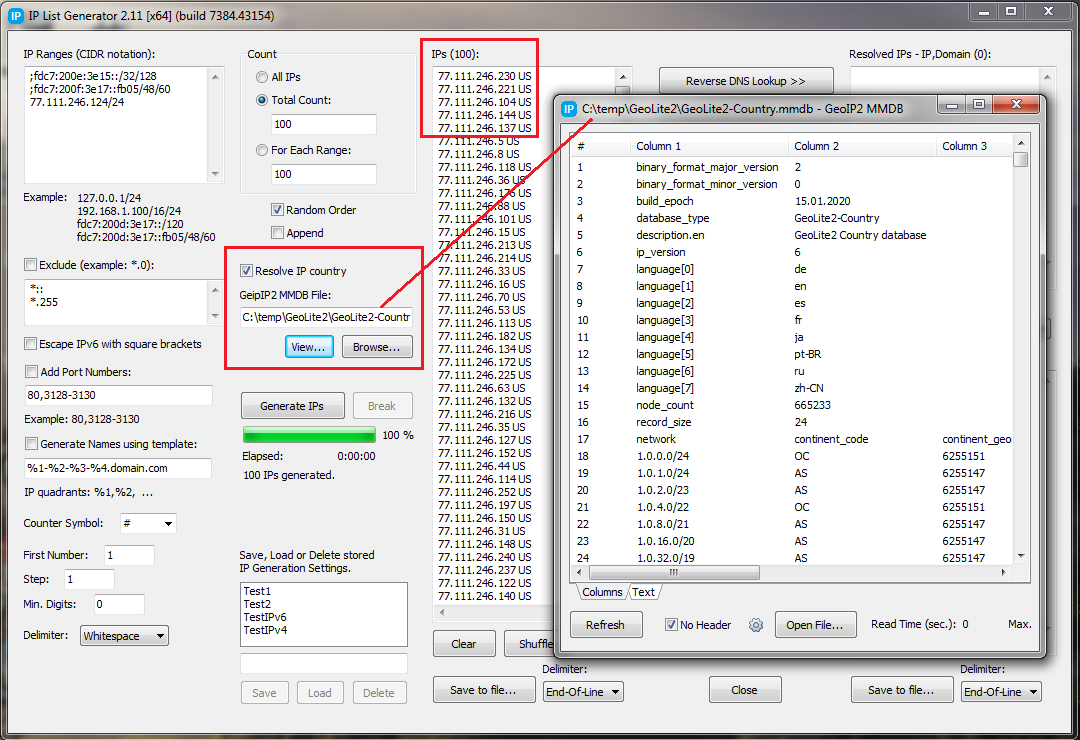
    <content type="html"><![CDATA[<p><em>by Vitaly, Friday, March 20th, 2020</em></p><p>Version 2.11 of the <a href="/ipgen2/">IP List Generator</a> has been released.</p><h3 id="What’s-New"><a href="#What’s-New" class="headerlink" title="What’s New"></a>What’s New</h3><p>New feature: find ISO country code for the country associated with the IP address.</p><p>IP List Generator uses MaxMind’s GeoIP2 binary database (MMDB) to resolve country by IP.</p><p><a href="/wpc/">Web Proxy Checker</a> also uses this database to find the country of the proxy by its IP.</p><p><a href="/blog/wp-content/uploads/2020/03/ipgen-2.11.png"><img src="/blog/wp-content/uploads/2020/03/ipgen-2.11-tn.png"></a></p>]]></content>


    <summary type="html">&lt;p&gt;&lt;em&gt;by Vitaly, Friday, March 20th, 2020&lt;/em&gt;&lt;/p&gt;
&lt;p&gt;Version 2.11 of the &lt;a href=&quot;/ipgen2/&quot;&gt;IP List Generator&lt;/a&gt; has been</summary>


    <category term="General" scheme="https://optinsoft.net/blog/categories/General/"/>
    
    <category term="IP List Generator" scheme="https://optinsoft.net/blog/categories/IP-List-Generator/"/>
    
    
  </entry>
  
  <entry>
    <title>HASH List Generator</title>
    <link href="https://optinsoft.net/blog/2020/03/19/p=640/"/>
    <id>https://optinsoft.net/blog/2020/03/19/p=640/</id>
    <published>2020-03-18T19:00:00.000Z</published>
    <updated>2025-09-21T13:29:47.111Z</updated>
    
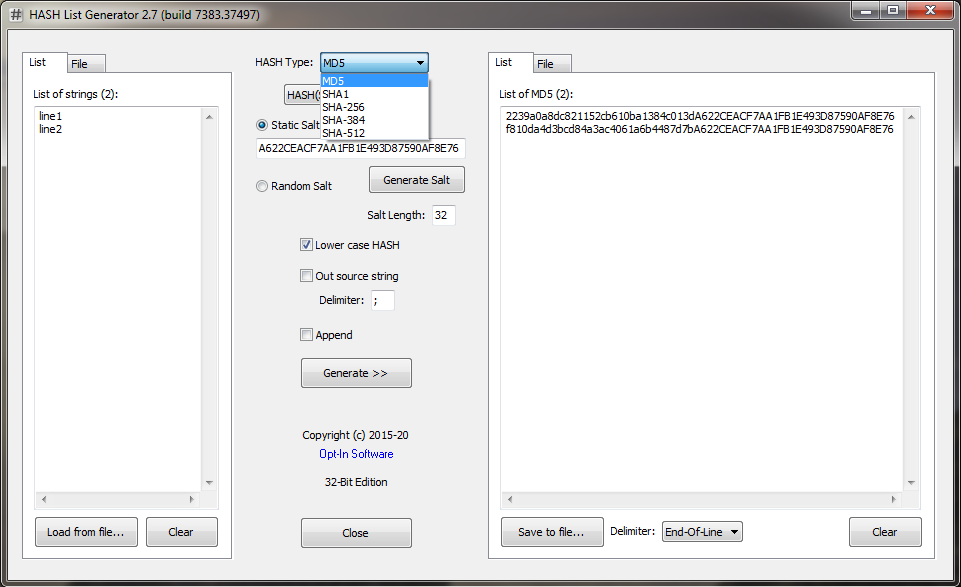
    <content type="html"><![CDATA[<p><em>by Vitaly, Thursday, March 19th, 2020</em></p><p><a href="/md5gen/">MD5 List Generator</a> has been renamed to <a href="/md5gen/">HASH List Generator</a>.</p><p>What’s new: calculating SHA1, SHA-256, SHA-384 and SHA-512 hash values.</p><p><a href="/blog/wp-content/uploads/2020/03/hash-list-generator-2.7.png"><img src="/blog/wp-content/uploads/2020/03/hash-list-generator-2.7-tn.png"></a></p>]]></content>


    <summary type="html">&lt;p&gt;&lt;em&gt;by Vitaly, Thursday, March 19th, 2020&lt;/em&gt;&lt;/p&gt;
&lt;p&gt;&lt;a href=&quot;/md5gen/&quot;&gt;MD5 List Generator&lt;/a&gt; has been renamed to &lt;a</summary>


    <category term="MD5 List Generator" scheme="https://optinsoft.net/blog/categories/MD5-List-Generator/"/>
    
    
  </entry>
  
  <entry>
    <title>Verify Emails (Account Verifier)</title>
    <link href="https://optinsoft.net/blog/2020/03/19/p=65/"/>
    <id>https://optinsoft.net/blog/2020/03/19/p=65/</id>
    <published>2020-03-18T19:00:00.000Z</published>
    <updated>2025-09-21T13:29:47.418Z</updated>
    
    <content type="html"><![CDATA[<p><em>by Vitaly, Wednesday, May 6th, 2015</em></p><p><a href="/av/">Account Verifier</a> allows to check the validity of email addresses.</p><ol><li>Select <em>Protocol</em>: SMTP.</li><li>Check “<em>Extract Servers from accounts</em>“ box.</li><li>Check “<em>MX Lookup</em>“ box.</li><li>Select <em>Check For</em>: RCPT TO.</li></ol>]]></content>


    <summary type="html">&lt;p&gt;&lt;em&gt;by Vitaly, Wednesday, May 6th, 2015&lt;/em&gt;&lt;/p&gt;
&lt;p&gt;&lt;a href=&quot;/av/&quot;&gt;Account Verifier&lt;/a&gt; allows to check the validity of email</summary>


    <category term="Account Verifier" scheme="https://optinsoft.net/blog/categories/Account-Verifier/"/>
    
    
  </entry>
  
  <entry>
    <title>Opt-In List Manager 1.6.105</title>
    <link href="https://optinsoft.net/blog/2020/03/19/p=648/"/>
    <id>https://optinsoft.net/blog/2020/03/19/p=648/</id>
    <published>2020-03-18T19:00:00.000Z</published>
    <updated>2025-09-21T13:29:47.272Z</updated>
    
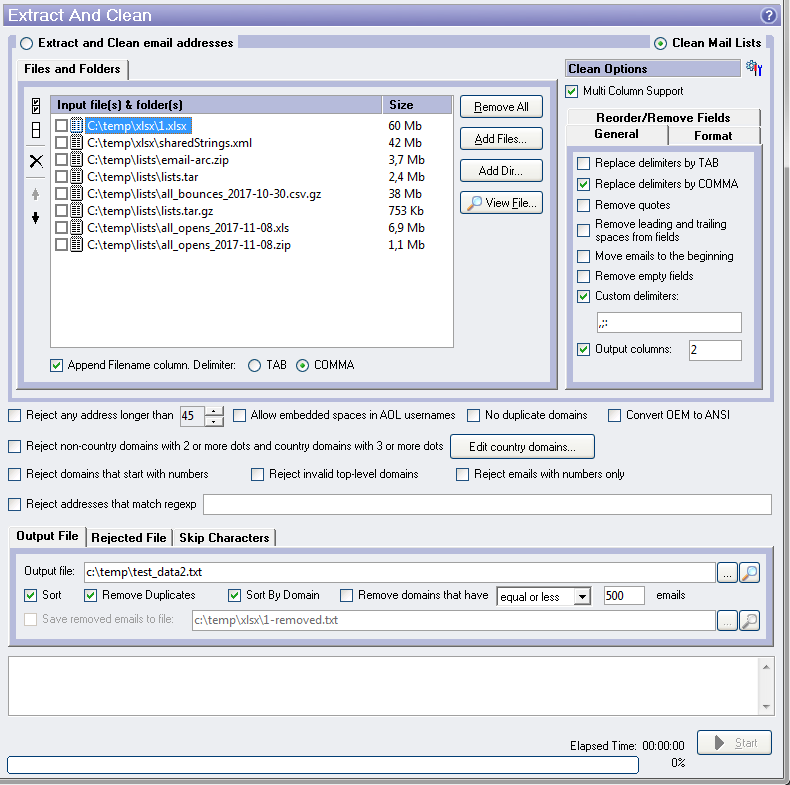
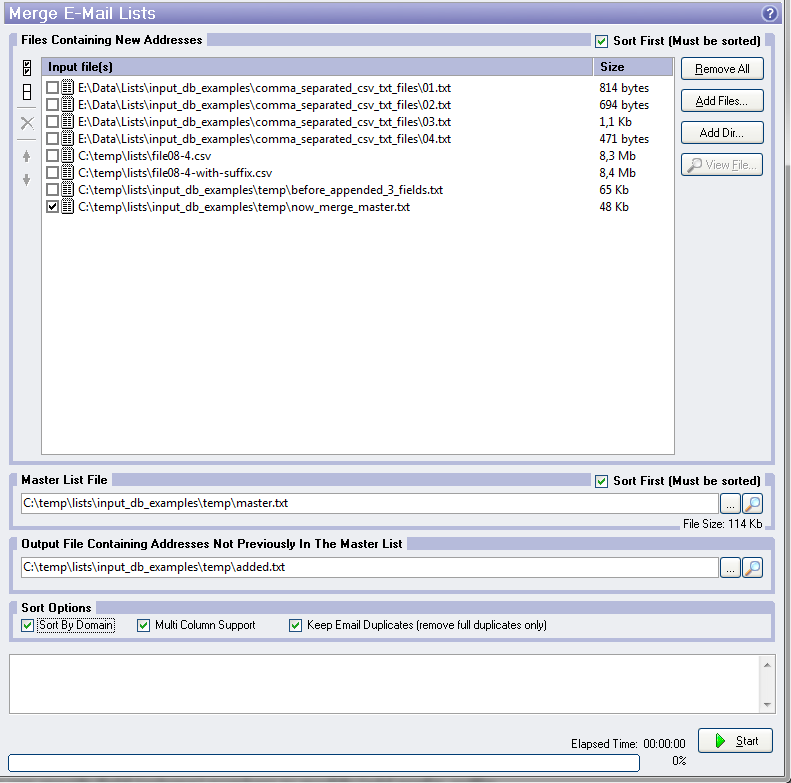
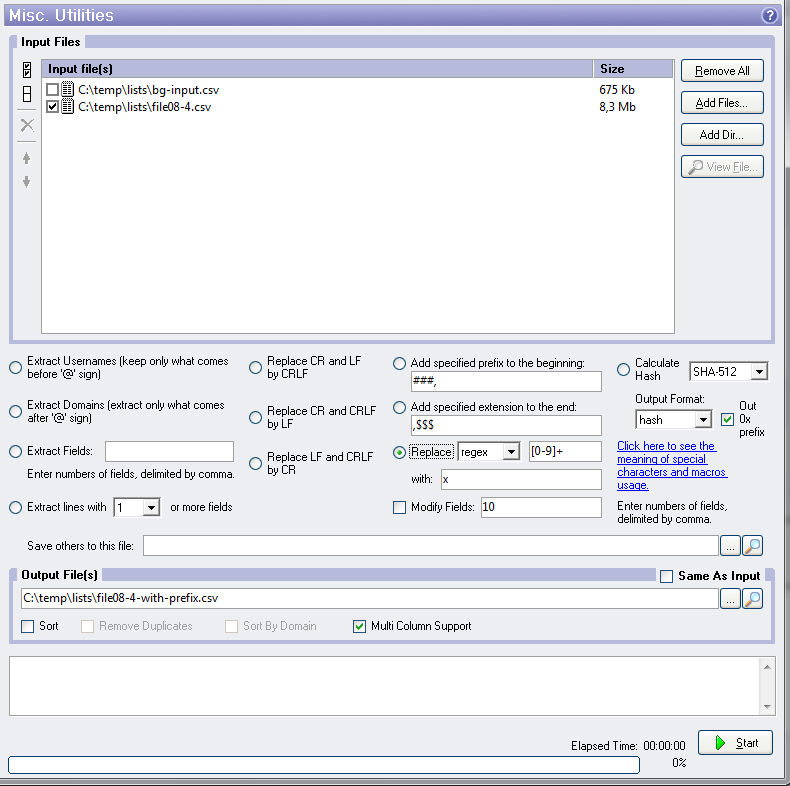
    <content type="html"><![CDATA[<p><em>by Vitaly, Thursday, March 19th, 2020</em></p><p>Version 1.6.105 of the <a href="/listmanager/">Opt-In List Manager</a> has been released.</p><h3 id="What’s-New"><a href="#What’s-New" class="headerlink" title="What’s New"></a>What’s New</h3><h4 id="Extract-And-Clean"><a href="#Extract-And-Clean" class="headerlink" title="Extract And Clean"></a>Extract And Clean</h4><ol><li>Clean Mail Lists: Remove empty fields (columns).</li><li>Clean Mail Lists: Custom field (column) delimiters.</li><li>Clean Mail Lists: The number of output columns. If the source row contains less than the specified number of columns, the list manager will add missing columns (blank). If the source row contains more than the specified number of columns, the list manager will cut extra columns.</li></ol><p><a href="/blog/wp-content/uploads/2020/03/oilm-1.6-extract-and-clean.png"><img src="/blog/wp-content/uploads/2020/03/oilm-1.6-extract-and-clean-tn.png"></a></p><h4 id="Merge-E-Mail-Lists"><a href="#Merge-E-Mail-Lists" class="headerlink" title="Merge E-Mail Lists"></a>Merge E-Mail Lists</h4><ol><li>Keep Email Duplicates (remove full duplicates only).</li></ol><p><a href="/blog/wp-content/uploads/2020/03/oilm-1.6-merge.png"><img src="/blog/wp-content/uploads/2020/03/oilm-1.6-merge-tn.png"></a></p><h4 id="Misc-Utilites"><a href="#Misc-Utilites" class="headerlink" title="Misc. Utilites"></a>Misc. Utilites</h4><ol><li>Replace blanks with the specified text.</li><li>Replace the matched regular expression pattern with the specified text.</li><li>You can specify field (column) numbers to modify (add prefix, suffix or replace the text).</li><li>Calculate SHA1, SHA-256 and SHA-512 hash values.</li></ol><p><a href="/blog/wp-content/uploads/2020/03/oilm-1.6-misc.png"><img src="/blog/wp-content/uploads/2020/03/oilm-1.6-misc-tn.png"></a></p>]]></content>


    <summary type="html">&lt;p&gt;&lt;em&gt;by Vitaly, Thursday, March 19th, 2020&lt;/em&gt;&lt;/p&gt;
&lt;p&gt;Version 1.6.105 of the &lt;a href=&quot;/listmanager/&quot;&gt;Opt-In List Manager&lt;/a&gt; has been</summary>


    <category term="Opt-In List Manager" scheme="https://optinsoft.net/blog/categories/Opt-In-List-Manager/"/>
    
    
  </entry>
  
  <entry>
    <title>Websites Loader 1.21</title>
    <link href="https://optinsoft.net/blog/2019/12/16/p=634/"/>
    <id>https://optinsoft.net/blog/2019/12/16/p=634/</id>
    <published>2019-12-15T19:00:00.000Z</published>
    <updated>2025-09-21T13:29:46.960Z</updated>
    
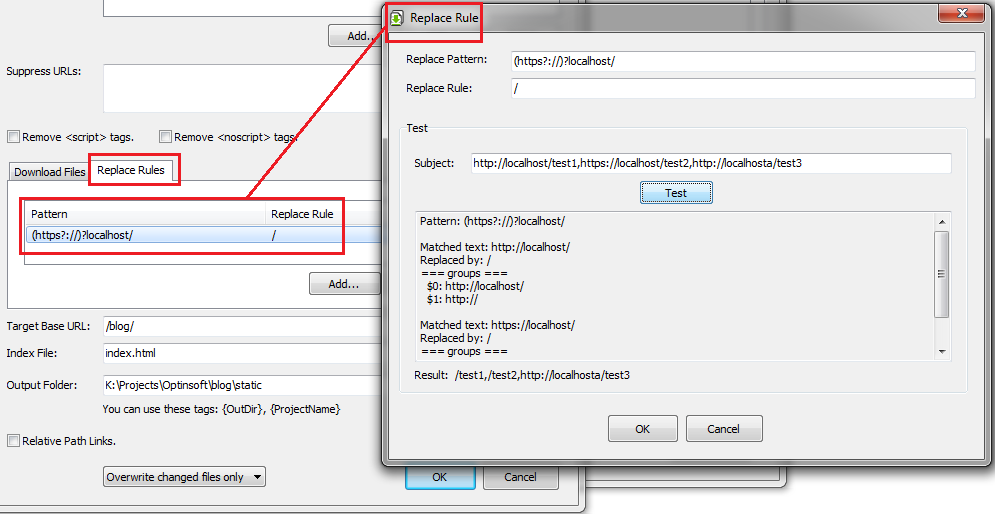
    <content type="html"><![CDATA[<p><em>by Vitaly, Monday, December 16th, 2019</em></p><p>Version 1.21 of the <a href="/oiwsl/">Websites Loader</a> 1.21 released.</p><h4 id="What’s-New"><a href="#What’s-New" class="headerlink" title="What’s New"></a>What’s New</h4><p><strong>Replace Rules</strong> has been added. Replace rule applies to HTML content and allows, for example, replace one domain by another.</p><p>Each rule consist of the pattern, which is regular expression, and the replacement value. Matching text will be replaced with the replacement value.</p><p>Replacement value can contain references to matching groups. Example:</p><pre><code class="hljs plaintext">Pattern: (https?://)?(localhost/)Replacement value: $2Subject: http://localhost/aaaResult: localhost/aaa</code></pre><p><a href="/blog/wp-content/uploads/2019/12/wsl-replace-rule.png"><img src="/blog/wp-content/uploads/2019/12/wsl-replace-rule-tn.png"></a></p><p>Tags: <a href="/blog/tag=load/">load</a>, <a href="/blog/tag=regular-expression/">Regular Expression</a>, <a href="/blog/tag=website/">website</a></p>]]></content>


    <summary type="html">&lt;p&gt;&lt;em&gt;by Vitaly, Monday, December 16th, 2019&lt;/em&gt;&lt;/p&gt;
&lt;p&gt;Version 1.21 of the &lt;a href=&quot;/oiwsl/&quot;&gt;Websites Loader&lt;/a&gt; 1.21 released.&lt;/p&gt;
&lt;h4</summary>


    <category term="Websites Loader" scheme="https://optinsoft.net/blog/categories/Websites-Loader/"/>
    
    
    <category term="Regular Expression" scheme="https://optinsoft.net/blog/tags/Regular-Expression/"/>
    
    <category term="load" scheme="https://optinsoft.net/blog/tags/load/"/>
    
    <category term="website" scheme="https://optinsoft.net/blog/tags/website/"/>
    
  </entry>
  
  <entry>
    <title>Opt-In List Manager 1.3.95</title>
    <link href="https://optinsoft.net/blog/2019/12/12/p=602/"/>
    <id>https://optinsoft.net/blog/2019/12/12/p=602/</id>
    <published>2019-12-11T19:00:00.000Z</published>
    <updated>2025-09-21T13:29:46.671Z</updated>
    
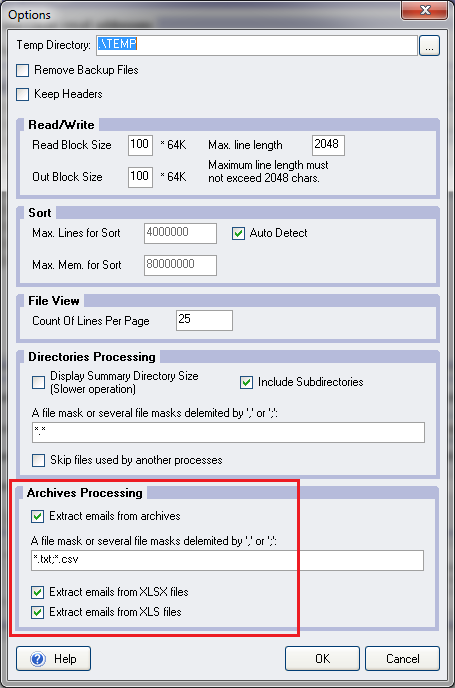
    <content type="html"><![CDATA[<p><em>by Vitaly, Thursday, December 12th, 2019</em></p><p>Version 1.3.95 of the <a href="/listmanager/">Opt-In List Manager</a> has been released.</p><h4 id="What’s-New"><a href="#What’s-New" class="headerlink" title="What’s New"></a>What’s New</h4><p>Extracting emails from the various sources has been improved. Now it can extract emails from:</p><ul><li>Archive files. Supported formats (file extensions): ZIP, JAR, EXE (self-extracted archives), TAR, GZ, TGZ, CAB, BZ2, TBZ.</li><li>XLSX files (Microsoft Excel Open XML Format Spreadsheet).</li><li>XLS files (Excel 97&#x2F;2003).</li></ul><p><a href="/blog/wp-content/uploads/2019/12/oilm-archive-processing.png"><img src="/blog/wp-content/uploads/2019/12/oilm-archive-processing-tn.png" alt="oilm-archive-processing"></a></p><p>Tags: <a href="/blog/tag=archive/">Archive</a>, <a href="/blog/tag=gzip/">GZIP</a>, <a href="/blog/tag=tar/">TAR</a>, <a href="/blog/tag=xls/">XLS</a>, <a href="/blog/tag=xlsx/">XLSX</a>, <a href="/blog/tag=zip/">ZIP</a></p>]]></content>


    <summary type="html">&lt;p&gt;&lt;em&gt;by Vitaly, Thursday, December 12th, 2019&lt;/em&gt;&lt;/p&gt;
&lt;p&gt;Version 1.3.95 of the &lt;a href=&quot;/listmanager/&quot;&gt;Opt-In List Manager&lt;/a&gt; has been</summary>


    <category term="Opt-In List Manager" scheme="https://optinsoft.net/blog/categories/Opt-In-List-Manager/"/>
    
    
    <category term="Archive" scheme="https://optinsoft.net/blog/tags/Archive/"/>
    
    <category term="GZIP" scheme="https://optinsoft.net/blog/tags/GZIP/"/>
    
    <category term="TAR" scheme="https://optinsoft.net/blog/tags/TAR/"/>
    
    <category term="XLS" scheme="https://optinsoft.net/blog/tags/XLS/"/>
    
    <category term="XLSX" scheme="https://optinsoft.net/blog/tags/XLSX/"/>
    
    <category term="ZIP" scheme="https://optinsoft.net/blog/tags/ZIP/"/>
    
  </entry>
  
  <entry>
    <title>Account Verifier</title>
    <link href="https://optinsoft.net/blog/2019/12/12/p=62/"/>
    <id>https://optinsoft.net/blog/2019/12/12/p=62/</id>
    <published>2019-12-11T19:00:00.000Z</published>
    <updated>2025-09-21T13:29:46.814Z</updated>
    
    <content type="html"><![CDATA[<p><em>by Vitaly, Tuesday, May 5th, 2015</em></p><p><a href="/av/">Account Verifier</a> 1.30 has been released.</p><p>This application allows to check SMTP, POP3, IMAP, FTP and HTTP accounts.<br>It has multi-threaded architecture and supports <a href="/proxies/">SOCKS and HTTPS proxies</a>.</p>]]></content>


    <summary type="html">&lt;p&gt;&lt;em&gt;by Vitaly, Tuesday, May 5th, 2015&lt;/em&gt;&lt;/p&gt;
&lt;p&gt;&lt;a href=&quot;/av/&quot;&gt;Account Verifier&lt;/a&gt; 1.30 has been released.&lt;/p&gt;
&lt;p&gt;This application</summary>


    <category term="Account Verifier" scheme="https://optinsoft.net/blog/categories/Account-Verifier/"/>
    
    
  </entry>
  
  <entry>
    <title>MaxMind DB Reader for Delphi</title>
    <link href="https://optinsoft.net/blog/2019/10/25/p=596/"/>
    <id>https://optinsoft.net/blog/2019/10/25/p=596/</id>
    <published>2019-10-24T19:00:00.000Z</published>
    <updated>2025-09-21T13:29:46.525Z</updated>
    
    <content type="html"><![CDATA[<p><em>by Vitaly, Friday, October 25th, 2019</em></p><p>The MaxMind DB file format is a database format that maps IPv4 and IPv6 addresses to data records using an efficient binary search tree.</p><p>MaxMind provides variety APIs for lookup IP information in their database: for C, C#, Go, Java. But, unfortunately, API for Delphi is missed. <a href="https://github.com/optinsoft/MMDBReader">MMDB Reader</a> project solves this omission.</p><p>Tags: <a href="/blog/tag=delphi/">Delphi</a>, <a href="/blog/tag=geo-ip/">Geo IP</a>, <a href="/blog/tag=ip/">IP</a>, <a href="/blog/tag=maxmind/">MaxMind</a>, <a href="/blog/tag=mmdb/">MMDB</a>, <a href="/blog/tag=reader/">Reader</a></p>]]></content>


    <summary type="html">&lt;p&gt;&lt;em&gt;by Vitaly, Friday, October 25th, 2019&lt;/em&gt;&lt;/p&gt;
&lt;p&gt;The MaxMind DB file format is a database format that maps IPv4 and IPv6 addresses</summary>


    <category term="General" scheme="https://optinsoft.net/blog/categories/General/"/>
    
    <category term="Open Source" scheme="https://optinsoft.net/blog/categories/Open-Source/"/>
    
    
    <category term="IP" scheme="https://optinsoft.net/blog/tags/IP/"/>
    
    <category term="Delphi" scheme="https://optinsoft.net/blog/tags/Delphi/"/>
    
    <category term="Geo IP" scheme="https://optinsoft.net/blog/tags/Geo-IP/"/>
    
    <category term="MaxMind" scheme="https://optinsoft.net/blog/tags/MaxMind/"/>
    
    <category term="MMDB" scheme="https://optinsoft.net/blog/tags/MMDB/"/>
    
    <category term="Reader" scheme="https://optinsoft.net/blog/tags/Reader/"/>
    
  </entry>
  
  <entry>
    <title>Double-asterisk</title>
    <link href="https://optinsoft.net/blog/2018/09/21/p=581/"/>
    <id>https://optinsoft.net/blog/2018/09/21/p=581/</id>
    <published>2018-09-20T19:00:00.000Z</published>
    <updated>2025-09-21T13:29:46.381Z</updated>
    
    <content type="html"><![CDATA[<p><em>by Vitaly, Friday, September 21st, 2018</em></p><p>New versions of <a href="/oicm/" title="Copy Manager">Copy Manager</a> and <a href="/oizm/" title="ZIP Manager">ZIP Manager</a> support the double asterisks in source patterns.</p><p>The double asterisk (**) followed by backslash (\) will cause to recursive inclusion of files from all subdirectories.</p><p>Example. Directory structure:</p><p><code>path\f1\</code><br><code>path\f1\a1\</code><br><code>path\e2\</code><br><code>path\e2\a1\</code><br><code>path\e2\b2\</code></p><p>Pattern <code>path\*\*.txt</code> matches <code>*.txt</code> files in subdiretories <code>path\f1\</code> and <code>path\e2\</code> (but NOT in <code>path\</code>, <code>path\f1\a1</code>, <code>path\e2\a1\</code>, <code>path\e2\b2\</code>).</p><p>Pattern <code>path\**\*.txt</code> matches <code>*.txt</code> files in <code>path\</code> and in all subdirectories (<code>path\f1\</code>, <code>path\f1\a1\</code>, <code>path\e2\</code>, etc.).</p><p>Pattern <code>path\f**\*.txt</code> matches <code>*.txt</code> files in all subdirectories of <code>path\</code> starting with <code>f</code>: <code>path\f1\</code>, <code>path\f1\a1\</code> (but NOT in <code>path\</code>, <code>path\e2\</code>, etc.).</p><p>Pattern <code>path\**\a1\*.txt</code> matches <code>*.txt</code> files in <code>path\f1\a1\</code> and <code>path\e2\a1\</code>.</p><p>Tags: <a href="/blog/tag=double-asterisk/">Double-asterisk</a></p>]]></content>


    <summary type="html">&lt;p&gt;&lt;em&gt;by Vitaly, Friday, September 21st, 2018&lt;/em&gt;&lt;/p&gt;
&lt;p&gt;New versions of &lt;a href=&quot;/oicm/&quot; title=&quot;Copy Manager&quot;&gt;Copy Manager&lt;/a&gt; and &lt;a</summary>


    <category term="Copy Manager" scheme="https://optinsoft.net/blog/categories/Copy-Manager/"/>
    
    <category term="ZIP Manager" scheme="https://optinsoft.net/blog/categories/ZIP-Manager/"/>
    
    
    <category term="Double-asterisk" scheme="https://optinsoft.net/blog/tags/Double-asterisk/"/>
    
  </entry>
  
  <entry>
    <title>Domain Resolver</title>
    <link href="https://optinsoft.net/blog/2017/05/15/p=575/"/>
    <id>https://optinsoft.net/blog/2017/05/15/p=575/</id>
    <published>2017-05-14T19:00:00.000Z</published>
    <updated>2025-09-21T13:29:46.233Z</updated>
    
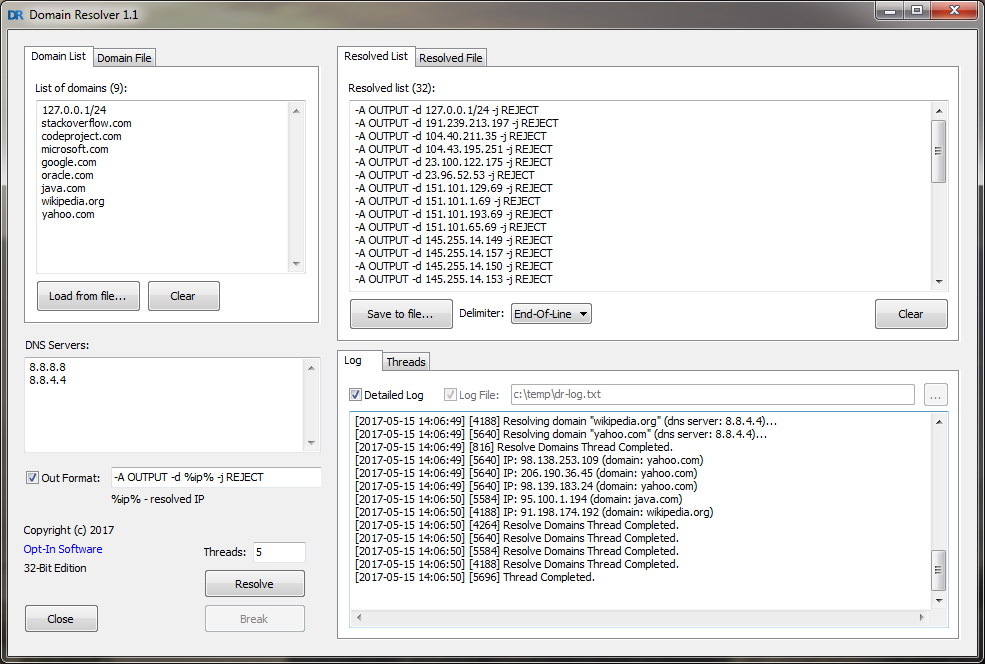
    <content type="html"><![CDATA[<p><em>by Vitaly, Monday, May 15th, 2017</em></p><p><a href="/dr/">Domain Resolver 1.1</a> has been released.</p><p>This tool allow to convert a list of domains to a list of IP addresses.</p><p><a href="/blog/wp-content/uploads/2017/05/dr.png"><img src="/blog/wp-content/uploads/2017/05/dr-tn.png" alt="dr-tn"></a></p><p>Tags: <a href="/blog/tag=domain/">Domain</a>, <a href="/blog/tag=ip/">IP</a>, <a href="/blog/tag=resolve/">Resolve</a></p>]]></content>


    <summary type="html">&lt;p&gt;&lt;em&gt;by Vitaly, Monday, May 15th, 2017&lt;/em&gt;&lt;/p&gt;
&lt;p&gt;&lt;a href=&quot;/dr/&quot;&gt;Domain Resolver 1.1&lt;/a&gt; has been released.&lt;/p&gt;
&lt;p&gt;This tool allow to</summary>


    <category term="Domain Resolver" scheme="https://optinsoft.net/blog/categories/Domain-Resolver/"/>
    
    
    <category term="IP" scheme="https://optinsoft.net/blog/tags/IP/"/>
    
    <category term="Domain" scheme="https://optinsoft.net/blog/tags/Domain/"/>
    
    <category term="Resolve" scheme="https://optinsoft.net/blog/tags/Resolve/"/>
    
  </entry>
  
</feed>